
Email Marketing, Built for B2B Growth.
DigiFy is a cloud-based email marketing and outreach platform that helps manufacturers, exporters, suppliers and growing businesses organize contacts, create personalized campaigns, send professional email communications and monitor campaign activity.
- Cloud-based
- Subscription SaaS
- Browser access
- Multi-tenant
Already a DigiFy user? Sign in to your account ↗
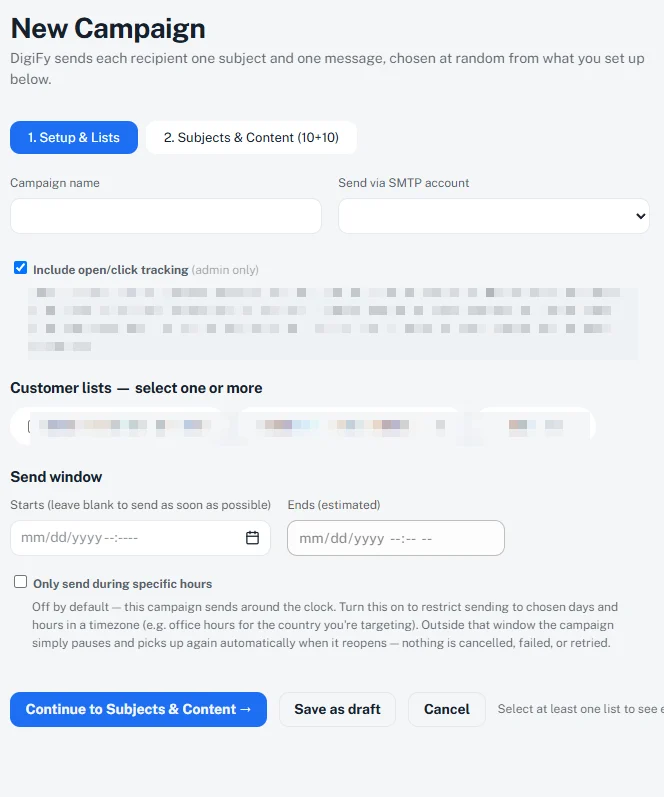
Screens from the DigiFy application. Personal and account details are hidden.
What is DigiFy?
DigiFy is a cloud-based, subscription email marketing and outreach platform. Businesses use it in a web browser to manage contacts and subscriber lists, prepare and send personalized email campaigns through their SMTP accounts, verify email addresses, handle unsubscribes and review campaign activity. It is built for B2B communication: buyer outreach, customer updates, lead follow-up and product announcements.
- Delivery
- Cloud-based SaaS, used in a web browser
- Access
- Subscription, with accounts set up on request
- Built for
- Manufacturers, exporters, suppliers, distributors and other B2B teams
- Platform
- Multi-tenant: one login per client, centrally managed
- Owner
- DigiFy is a RightBPO-owned and operated product
Everything You Need to Run Structured B2B Email Outreach
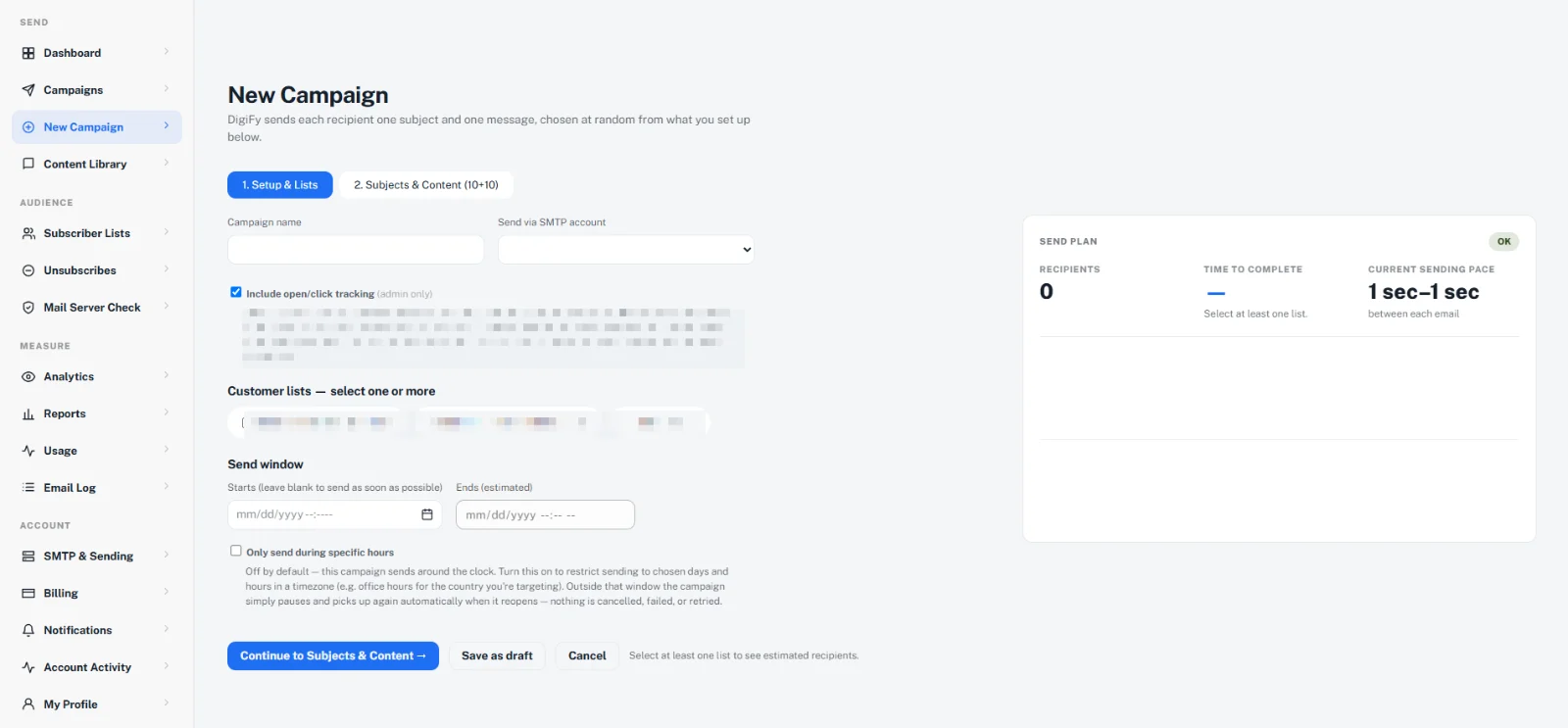
One cloud platform for the whole outreach workflow, from the contact list to the campaign report. This is the actual DigiFy navigation.
Send
- Dashboard
- Campaigns
- New Campaign
- Content Library
Audience
- Subscriber Lists
- Unsubscribes
- Mail Server Check
Measure
- Analytics
- Reports
- Usage
- Email Log
Account
- SMTP & Sending
- Billing
- Notifications
- Account Activity
- My Profile
B2B outreach outgrows spreadsheets and inboxes.
Contacts are scattered
Buyers, importers, distributors and prospects sit in spreadsheets, inboxes and old exports.
Every campaign is built by hand
Lists, subject lines, messages and sending accounts are assembled again for each send.
There is no clear record afterwards
It is hard to see what was sent, what failed and why, and who has opted out.
DigiFy brings structured email outreach into one cloud platform.
Organize your audiences, prepare reusable content, send through your own SMTP accounts and review what happened, in one browser-based workspace.
Contact and subscriber management for your buyers and prospects.
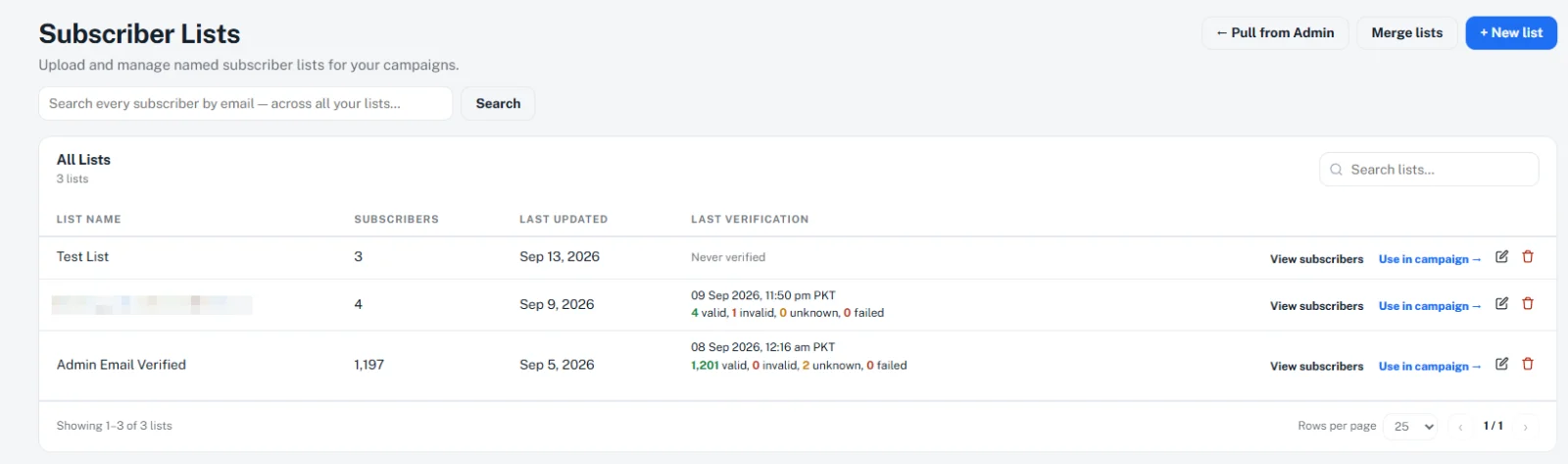
Keep your business audiences organized in named subscriber lists, and see the state of every list at a glance.
- Import contacts into a list, or add subscribers one at a time
- Create and name subscriber lists, and merge lists
- Search every subscriber across all your lists from one box
- Filter a list by status, subscription and mail-server check
- See each list’s subscriber count, last update and last verification
- Use one or more lists in a campaign, and export a list to CSV
- International buyers
- Importers
- Distributors
- Existing customers
- Prospects
- Regional markets
Campaign management built for structured sends.
A campaign is set up in two steps: setup and lists, then subjects and content. Everything that controls the send is in one place.
- 01
Name it and choose a sending account
Pick the SMTP account the campaign sends through.
- 02
Select your lists
Choose one or more customer lists as recipients.
- 03
Set the send window
Start as soon as possible or at a set time, and optionally send only during chosen days and hours in a time zone.
- 04
Add subjects and content
Each recipient receives one subject and one message, chosen at random from the variations you set up.
- 05
Choose tracking, review and send
Switch open and click tracking on or off for the campaign, check the send plan, then save as a draft or send.
The send plan shows the recipient count, the time to complete and the pace between emails before you send.
Personalized communication without writing every message by hand.
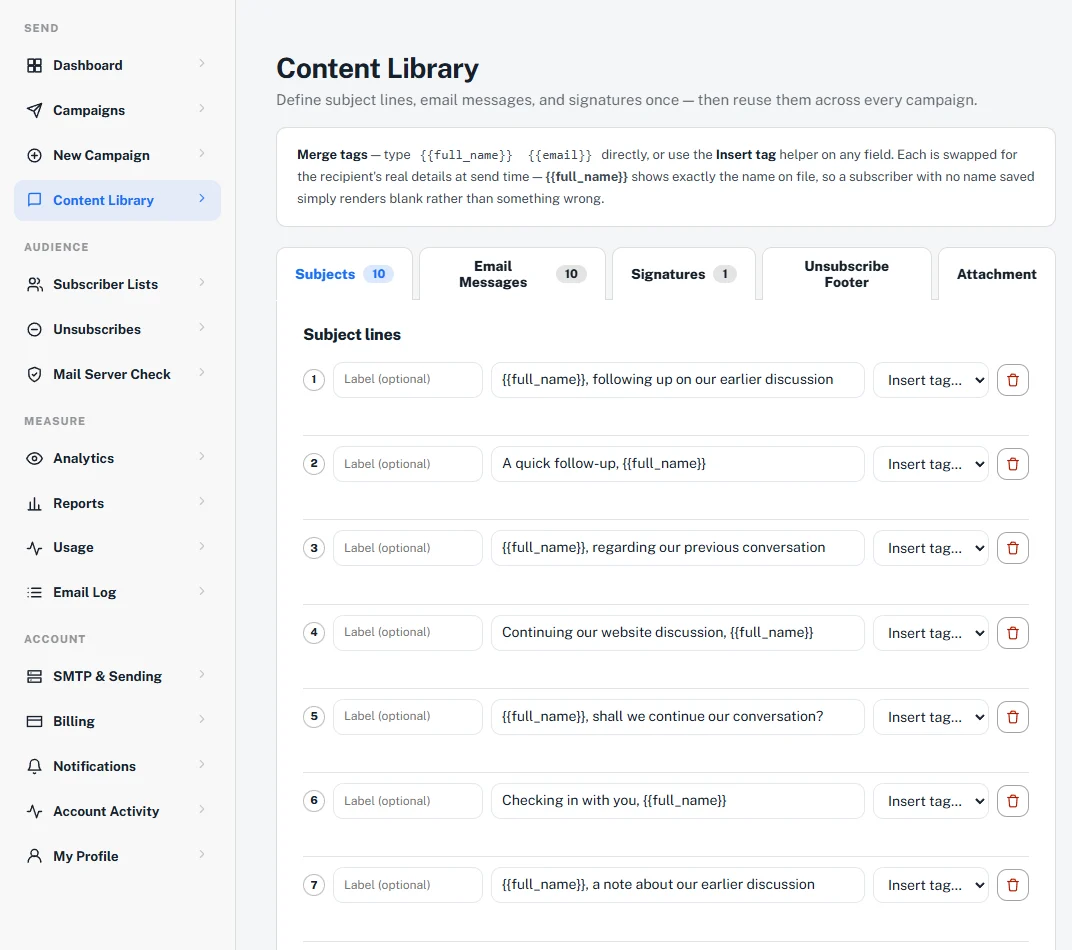
Define subject lines, email messages and signatures once, then reuse them across every campaign. Merge tags fill in each recipient’s details when the email is sent.
- Reusable subject lines and email messages
- Email signatures, an unsubscribe footer and attachments
- Merge tags, typed directly or added with the Insert tag helper
- If a subscriber has no name saved, the name simply renders blank
- Several subject and message variations per campaign

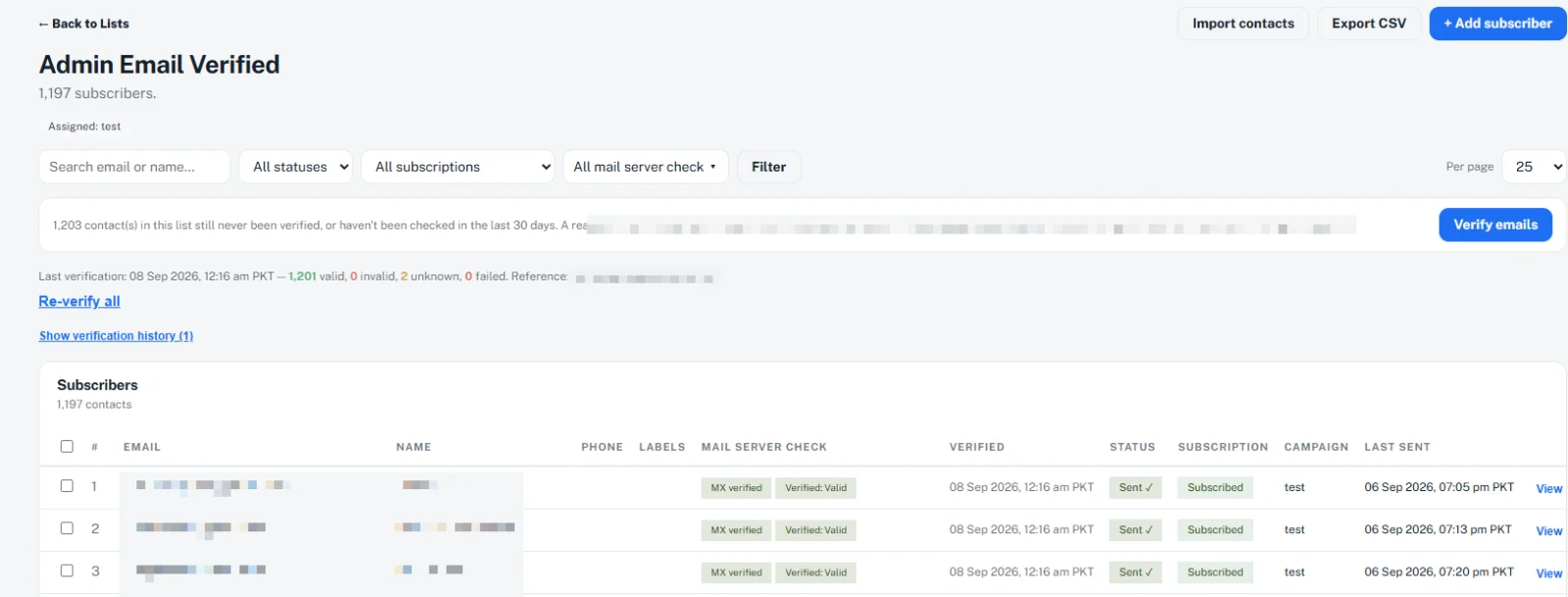
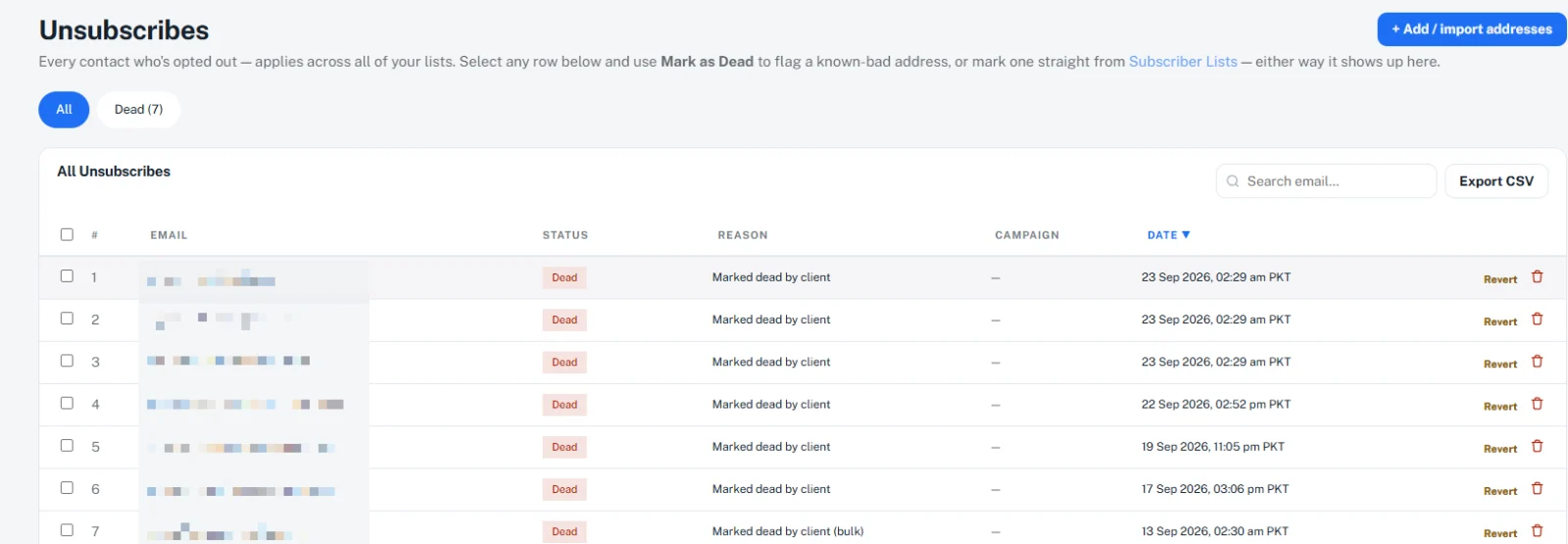
Email verification and unsubscribe management.
Improve contact quality and gain visibility into email verification and delivery issues before your next send.
- Verify the emails on a list, and re-verify when you need to
- See each subscriber’s mail-server (MX) check and verified status
- Results are counted as valid, invalid, unknown or failed, with a verification history
- Filter a list by mail-server check result
- Manage unsubscribes across all of your lists in one place
- Mark known-bad addresses as dead, revert them, add or import addresses, and export to CSV
DigiFy helps you see and manage contact quality. It does not guarantee inbox delivery: that depends on your sending account, your lists and the receiving mail servers.
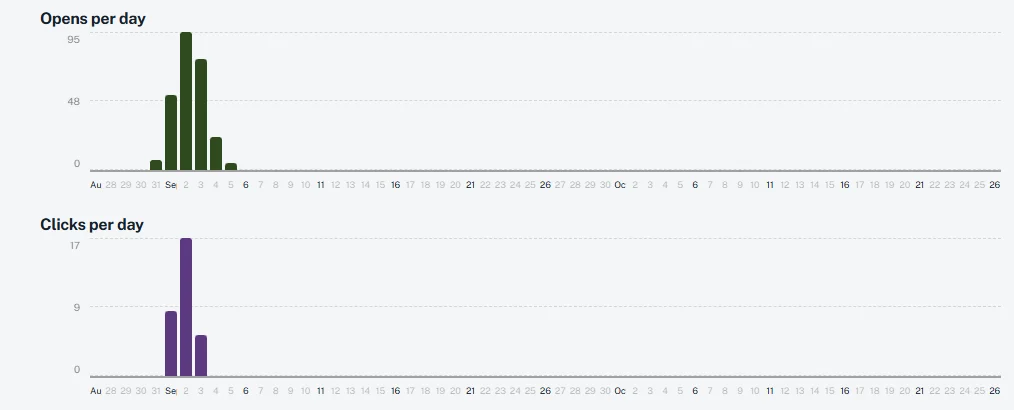
Analytics and reporting: understand measurable campaign activity.
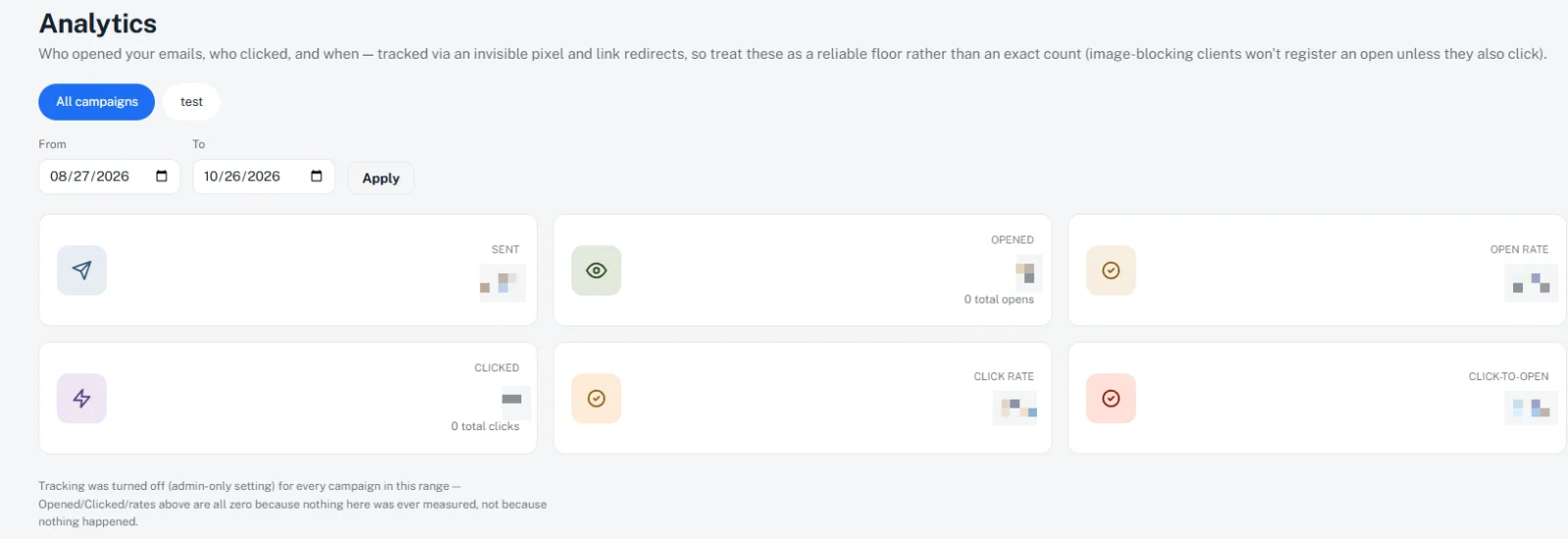
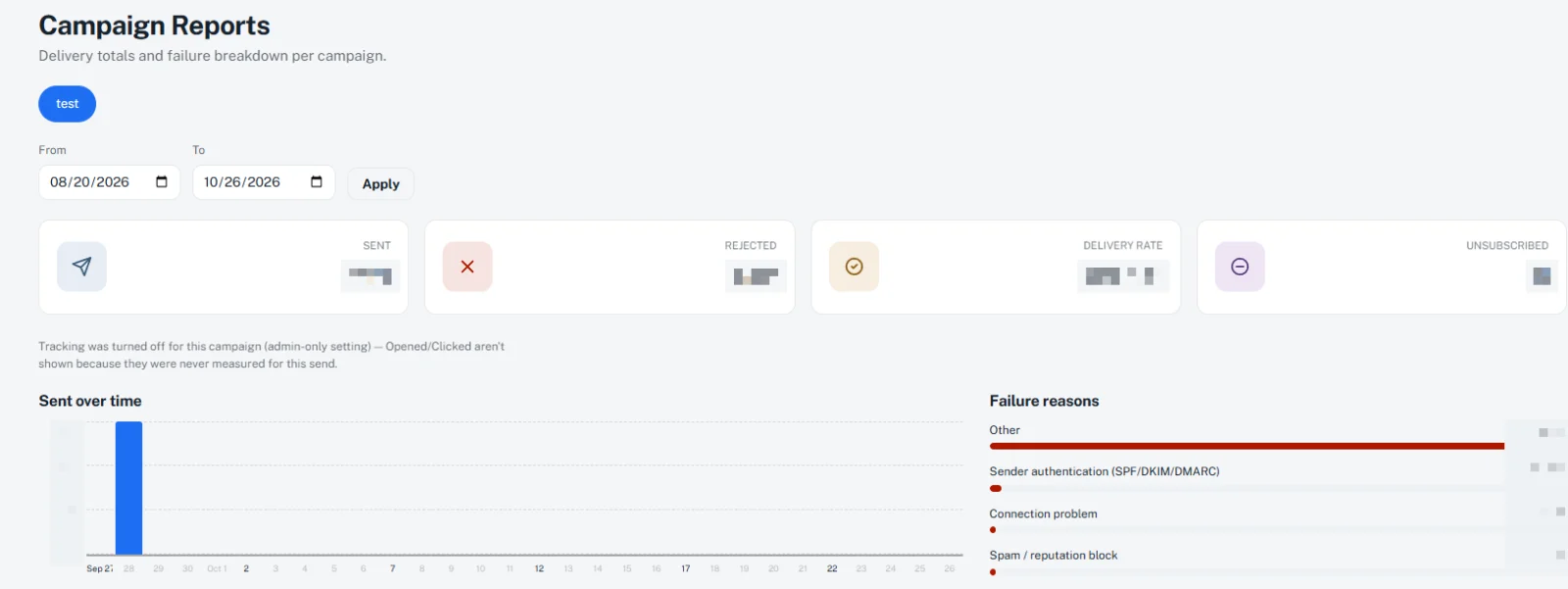
Two views cover how a campaign performed: Analytics for engagement, and Reports for delivery.
Opens and clicks are measured with a tracking pixel and link redirects, and tracking can be switched off for a campaign. Treat the numbers as a minimum rather than an exact count, and as not measured where tracking was off.
Analytics
- Sent, opened and clicked
- Open rate, click rate and click-to-open
- Opens and clicks per day
- Filter by campaign and date range
Email log
- A record of every email across your lists and campaigns
- Status, with the reason shown for failed or stopped sends
- Search, and filter by list, campaign and status
Reports
- Sent, rejected, delivery rate and unsubscribed
- Sent over time
- Failure reasons by type, such as sender authentication, connection problems and spam or reputation blocks
- What the receiving servers said
Built for Businesses That Sell Beyond Borders
If you manufacture or export products and keep a long list of buyers, distributors and enquiries, DigiFy gives that outreach a structured home. These are examples of how B2B teams use it.
Product outreach
Introduce your product range to potential buyers and distributors.
Buyer communication
Keep structured communication going with prospects and customers.
Market expansion
Reach business contacts in new geographic markets.
Distributor communication
Keep distributors and agents informed about products and updates.
Product announcements
Share new products, certifications, capabilities and company updates.
Follow-up campaigns
Stay connected with prospects and previous enquiries.
Examples of the businesses that use this kind of outreach
- Salt
- Spices
- Rice
- Food products
- Minerals
- Leather
- Sports goods
- Textiles
- Surgical instruments
- Industrial products
- Engineering
- Furniture
- Packaging
These are examples, not limits. DigiFy suits any B2B business that communicates with buyers, customers and prospects by email.
How it works.
- 01
Organize your contacts
Import and manage your business contact lists.
- 02
Prepare your campaign
Choose recipients, subjects and reusable email content.
- 03
Send
Configure your sending account and campaign preferences.
- 04
Measure
Review delivery activity, engagement and campaign reports.
Your Email Marketing Platform, in the Cloud.
DigiFy is a cloud-based, subscription software-as-a-service platform. You open it in your browser and it is managed centrally for you.
Nothing to install
There is no software to download and no servers for you to manage.
Browser-based access
Sign in from a web browser to work on campaigns and lists.
Subscription-based
Access is by subscription. Usage and plan limits are shown in your account.
Centrally managed
The platform is operated and maintained centrally.
An environment per account
Each business works in its own account, with its own lists, content and sending accounts.
Accounts set up on request
New to DigiFy? Tell us about your email needs and we will set up your account.
Built as a Multi-Tenant SaaS Platform
DigiFy is multi-tenant: one login per client. Businesses work inside their own account environment while the platform itself is managed centrally. Agencies can keep each client’s lists and sending accounts separate.
More from RightBPO
Questions about DigiFy.
What is DigiFy?
DigiFy is a cloud-based, subscription email marketing and outreach platform. Businesses use it in a web browser to manage contacts and subscriber lists, prepare and send personalized email campaigns through their SMTP accounts, verify email addresses, manage unsubscribes and review campaign activity.
Is DigiFy a cloud-based email marketing platform?
Yes. DigiFy is a cloud-based software-as-a-service platform that you use in a web browser. It is managed centrally, so there are no servers for you to run.
Is DigiFy subscription based?
Yes. DigiFy is offered as a subscription service. Accounts are set up on request, and usage and plan limits are shown in your account. Pricing is not listed on this page, so request a demo to discuss it.
Do I need to install DigiFy?
No. There is nothing to download or install. You sign in to your DigiFy account from a web browser.
Who is DigiFy designed for?
DigiFy is designed for B2B businesses that email buyers, customers and prospects: manufacturers, exporters, suppliers, distributors, trading companies, SMEs and sales and marketing teams. Agencies can also keep each client’s lists and sending accounts separate.
Who owns DigiFy?
DigiFy is a RightBPO-owned and operated product.
Can manufacturers use DigiFy?
Yes. Manufacturers can organize buyer and distributor lists, prepare reusable product messages, send campaigns and review the activity in reports and the email log.
Can exporters use DigiFy?
Yes. Exporters can keep separate lists for importers, distributors, existing customers, prospects and regional markets, and send product introductions, announcements and follow-ups from one platform.
Can I import existing contact lists?
Yes. You can import contacts into a subscriber list or add subscribers one at a time, and you can export a list to CSV.
Can I manage multiple subscriber lists?
Yes. You can create named lists, merge lists, search across all of your lists, and choose one or more lists for a campaign.
Can I personalize emails?
Yes. Merge tags such as {{full_name}} and {{email}} are replaced with each recipient’s details when the email is sent. You can also save reusable subject lines, messages and signatures, and use several variations in a campaign.
Can I verify email addresses?
Yes. DigiFy can verify the emails on a list, including a mail-server (MX) check, and shows each address as valid, invalid, unknown or failed. You can re-verify and review the verification history.
Can I manage unsubscribed contacts?
Yes. The Unsubscribes page lists every contact who has opted out across all of your lists. You can mark known-bad addresses as dead, revert them, add or import addresses, and export the list.
Can I track campaign activity?
Yes. DigiFy shows sent, rejected and failed emails, and opens and clicks when tracking is on. Tracking can be switched off for a campaign, and open and click counts should be read as a minimum, not an exact count.
Can I view campaign reports?
Yes. Reports show sent, rejected, delivery rate and unsubscribed totals for a campaign, how sending went over time, the failure reasons by type, and what the receiving servers said. The email log shows the reason for each recipient.
Can I connect SMTP accounts?
Yes. DigiFy sends through SMTP accounts, and you choose the sending account for each campaign. Multiple SMTP accounts are supported.
Will it guarantee my emails reach the inbox?
No. Delivery depends on factors such as the sending account, list quality and the receiving provider. DigiFy gives you verification tools and reports so you can see what was sent and what failed.
Does DigiFy have an API?
DigiFy’s product information lists API and webhook capabilities. What they support is covered in the demo, so please ask us about your use case.